Finding the best gaming laptop and editing laptop can feel confusing with so many options in the market. If you play games and also edit videos, you need a machine that can handle both without slowing down.
A good laptop for editing should also double up as a strong gaming machine, so you don’t have to buy two separate devices. In this guide, we will look at some top models, what to check before buying and share some quick tips to help you pick the right one in 2026.
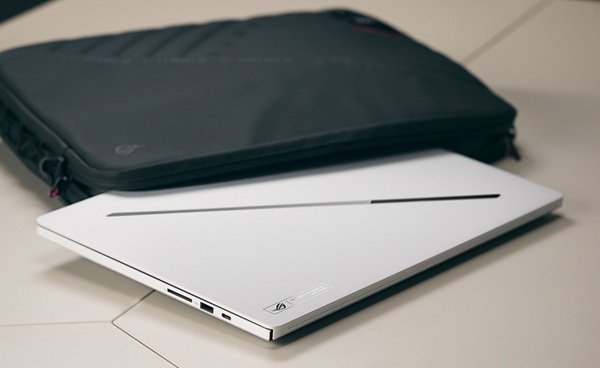
Best picks for gaming and editing in India 2026
ASUS ROG Zephyrus G16
The ASUS ROG Zephyrus G16 is a strong laptop for editing that also delivers powerful gaming performance. With a stunning 2.5K OLED display, fast processor and sleek lightweight design, it easily handles heavy editing software, creative projects and demanding games alike. This laptop brings together speed, style and performance in one impressive package built for both creators and gamers.
| Specification | Details |
| Processor | Up to Intel® Core™ Ultra 9 386H, up to 4.9GHz (16 cores, 16 threads) |
| Graphics | Up to 12GB GDDR7 NVIDIA® GeForce RTX™ 5070 Ti Laptop GPU |
| Memory (RAM) | Up to 32GB LPDDR5X, 8533MT/s |
| Storage | 1TB PCIe 4.0 NVMe SSD, upgradeable up to 4TB |
| Display | 40.64 cm (16-inch) 2.5K OLED, 240Hz refresh rate, 1100 nits peak brightness, G-Sync |
| Price | ₹449,990 |
Disclaimer: Prices are subject to change, kindly visit the product website for actual costing.
Dell XPS 16
The Dell XPS 16 offers premium build quality and strong everyday performance in a sleek design. With Intel Core Ultra processors, NVIDIA RTX graphics and a sharp 2K display, it easily handles creative projects, multitasking and light gaming.
| Specification | Details |
| Processor | Up to Intel® Core™ Ultra 7 255H (16 cores, up to 5.1GHz Turbo) |
| Graphics | Up to NVIDIA® GeForce RTX™ 5050, 8GB GDDR7 |
| Memory (RAM) | Up to 16GB LPDDR5X, 7467MT/s |
| Storage | 1TB M.2 PCIe NVMe SSD |
| Display | 41.40 cm (16.3-inch) 2K, 30-120Hz refresh rate, 500 nits brightness |
| Price | ₹249,990 |
Disclaimer: Prices are subject to change, kindly visit the product website for actual costing.
HyperX OMEN 16
The HP OMEN 16 Valorant Edition brings a bold design with serious performance. Powered by AMD Ryzen processors and NVIDIA RTX graphics, it delivers fast frame rates, sharp visuals and a smooth gaming experience for competitive players.
| Specification | Details |
| Processor | AMD Ryzen™ 7 8745HX |
| Graphics | NVIDIA® GeForce RTX™ 5060, 8GB |
| Memory (RAM) | 16GB |
| Storage | 1TB PCIe Gen4 NVMe M.2 SSD |
| Display | 40.6 cm (16-inch), 2K (1920×1200), 165Hz, 3ms response time |
| Price | ₹1,99,999 |
Disclaimer: Prices are subject to change, kindly visit the product website for actual costing.
What to check before buying a gaming and editing laptop
Before you buy a laptop, keep these points in mind:
Processor (CPU)
A strong processor helps with fast video exports and smooth gameplay. Pick at least an Intel® Core™ i7 or AMD Ryzen™ 7 chip or higher if your budget allows.
Graphics Card (GPU)
This is one of the most important parts for a gaming laptop. A dedicated GPU like GeForce RTX™ 4060 or higher gives you smooth frames in games and also speeds up video rendering.
RAM
16GB of RAM is enough for editing and playing games. But if you often work with big 4K videos, get 32GB so your laptop doesn’t slow down.
Storage
Pick an SSD with storage between 512GB and 1TB. This will help since SSDs are much faster than old hard drives, so files and games always load faster.
Display
High refresh rates like 120Hz or 144Hz improve game graphics. Color accuracy is very important for editing footage grading.
Quick buying tips
- Check the cooling system. Gaming and editing both make your laptop heat up during long use, so good cooling keeps performance smooth.
- Look at battery life if you carry your laptop around a lot. Longer battery life means less time stuck near a charger.
- Make sure the laptop has enough ports like USB-C and HDMI. This helps you connect external monitors easily when needed.
- Test the keyboard and trackpad comfort before buying. This is very important if you edit or play games a lot and use shortcuts a lot.
Bottom Line
Choosing between laptop for editing or gaming doesn’t have to be hard. Focus on a strong processor, a good GPU, enough RAM and a solid display. Once these boxes are ticked, you’ll get a laptop that handles both gaming sessions and editing projects without any trouble in 2026.